
Emissive Materials...
This week started with me thinking: ok, I have bloom, now I need emissive materials to really take advantage of bloom and make it pop!
This made me open a can of worms : how do I author my textures? should I store an emissive intensity as alpha of my albedo textures and assume albedo is also the emissive color? should I have a new emissive texture instead so albedo can be different from emissive color? What about my metallic-roughness textures, should they still be stored in Red and Green channels respectively, or should I use the more standard "ORM" layout (Red = Occlusion, Green = Roughness, Blue = Metallic)? How much freedom do I want and what should be "locked" by the engine vs by the game?
So many questions, and the only thing I knew for sure was: if a decision is tied to how the rendering pipeline is structured (the "opaque > ssao > ssr > opaque composition > ..." flow & exchange of data through render targets, which is hard-coded into the engine) then it belongs to the engine. Otherwise I want to keep as much as possible on the game's side so all data-driven.
Better Material & Texture Management
Therefore the first step was about improving some of my structures:
1. My `ImageData` structure only supported decoded pixels and a single LOD (for mipmaps), so I updated it to be able to (soon) support compressed formats (DDS, KTX : if you are not aware, those are special kinds of compressed image formats that can be sent to VRAM as-is and, unlike PNG or JPEG, don't need to be decoded entirely to be sampled meaning they use very little VRAM) with mip levels.
2. The lifetime of my textures was tied to a material meaning a same texture on VRAM couldn't be shared between materials, so I added a custom GPU resource registry for textures to allow sharing
3. Shaders (logic) and Materials (configurations) were not the easiest to create (in particular to support the new kinds of emissive or alpha-tested materials I want to support), so I introduced new structures to make it super easy to extend:
// A) the shader defines the logic
struct ShaderDefinition
{
    filesystem::path sourcePath;

    // Define the types of textures this shader expects
    struct TextureSlot
    {
        string name;
        // ...
    };
    vector<TextureSlot> textureSlots;

    // Define the types of uniform parameters this shader expects
    struct Uniform
    {
        string name;
        // ...
    };
    vector<Uniform> uniforms;

    // Other draw-call parameters for this shader
    bool isMasked;
    bool isTwoSided;
};

// B) the material defines a configuration for a shader
struct MaterialDefinition
{
    shared_ptr<ShaderDefinition const> shader;

    unordered_map<string, shared_ptr<TextureDefinition const>> texturesByTextureSlotName;
    unordered_map<string, UniformValue> uniformValuesByUniformName;
};
4. Texture layouts (what each channel is for) was hard coded both in the shader and in the image meaning any mismatch was fatal (shader expects roughness in red but image has it in blue), so I introduced a new TextureDefinition struct with its settings that configure how a texture is loaded with parameters such as swizzle (it allows switching channels at runtime, or assigning them specific value when unset) or color space (oh, yes, I added support for sRGB to have better looking textures).
struct TextureDefinition
{
    filesystem::path imagePath;

    TextureSettings textureSettings;
};

struct TextureSettings
{
    ColorSpace colorSpace; // Linear or Srgb
    SamplerType samplerType; // Simple or Array or Cube
    array<GraphicEnum, 4> swizzle = { Red, Green, Blue, Alpha }; // can be swapped to load a texture with different channels layout

};
Forgive me, this bit was super important for the health of my codebase but has no visual impact. Stay tuned!
Anisotropic filtering
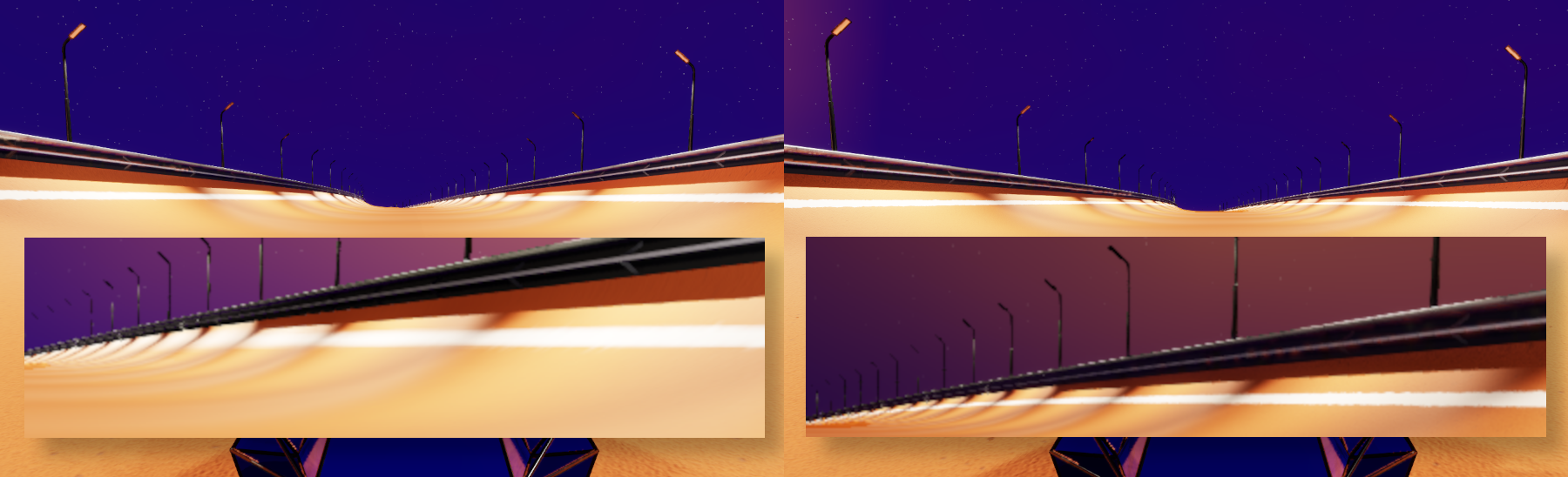
A friend playing the demo version of my game said "it's nice, however when I drive on ice I would like to see that red line so I know where to place my car, except it's all blurry so I can't see it". I wasn't sure what the issue was initially but eventually figured it out: isotropic filtering.
In short, when you apply a texture to a drawn triangle, either you have no mipmap (and the details of the texture will be very jittery at a distance) or you have mipmap. If you have mipmap, the texture sampler must decide for each drawn pixel the levels of details from the mipmap to use and where in the texture to perform samples (usually multiple are made and combined). The default way to do it is isotropic: it assumes what is drawn on the pixel is square and thus doesn't select appropriate mip levels for its samples to correctly represent surfaces drawn at a grazing angle: surfaces appear blurry.
Anisotropic filtering is the solution to this issue. It's a bit more expensive, but it's just a configuration and makes all the difference:
Partial shaders
Since I recently (2 weeks ago?) clarified my rendering pipeline, I decided it was time to simplify my shaders. Indeed, if every shader needs to return the color, normal, and roughness data, I don't need to rewrite every shader code from the ground up (including declaring outputs, etc.). Instead, the engine code now expects the game code to provide partial shaders, meaning a shader that only has to define a set of simpler functions (here the main one is a function that returns {color, normal, roughness}). This makes shaders even easier to write than they were, since they only need to define what is specific to their type of materials. A bit like, in unreal, a material graph (what I call shader) just feeds a BRDF node and doesn't have to specify what is common to all material graphs.
Here is a sample of my new lit material that is written to read albedo, normal, and metallic/roughness from 3 distinct textures:
#include "core/bindings.glsl"

layout(binding = BINDING_TEXTURE_SHADING_MATERIAL_BEGIN) uniform sampler2D albedo;
layout(binding = BINDING_TEXTURE_SHADING_MATERIAL_BEGIN + 1) uniform sampler2D normalMap;
layout(binding = BINDING_TEXTURE_SHADING_MATERIAL_BEGIN + 2) uniform sampler2D orm;

#include "core/shading_utils.glsl"

OpaqueOutputs getOpaqueOutputs()
{
    vec4 albedoSample = texture(albedo, vUv);
    vec3 ormSample = texture(orm, vUv).rgb;
    vec3 normalMapSample = texture(normalMap, vUv).rgb * 2.0 - 1.0;
    vec3 normal = normalize(vTBN * normalMapSample);

    return shadeOpaqueSurface(
        gl_FragCoord, vPosition, normal, albedoSample.rgb, ormSample.r, ormSample.g, ormSample.b);
}
No visual change with this improvement, sorry.
Improve lighting
A large number of bugs were present in my rendering code, and I fixed a few:
- surfaces at grazing angles were too dark
- spot lights had no falloff (they would be full intensity regardless of distance)
- completely smooth surfaces had unpredictable specular highlights (division by zero)
But most importantly:
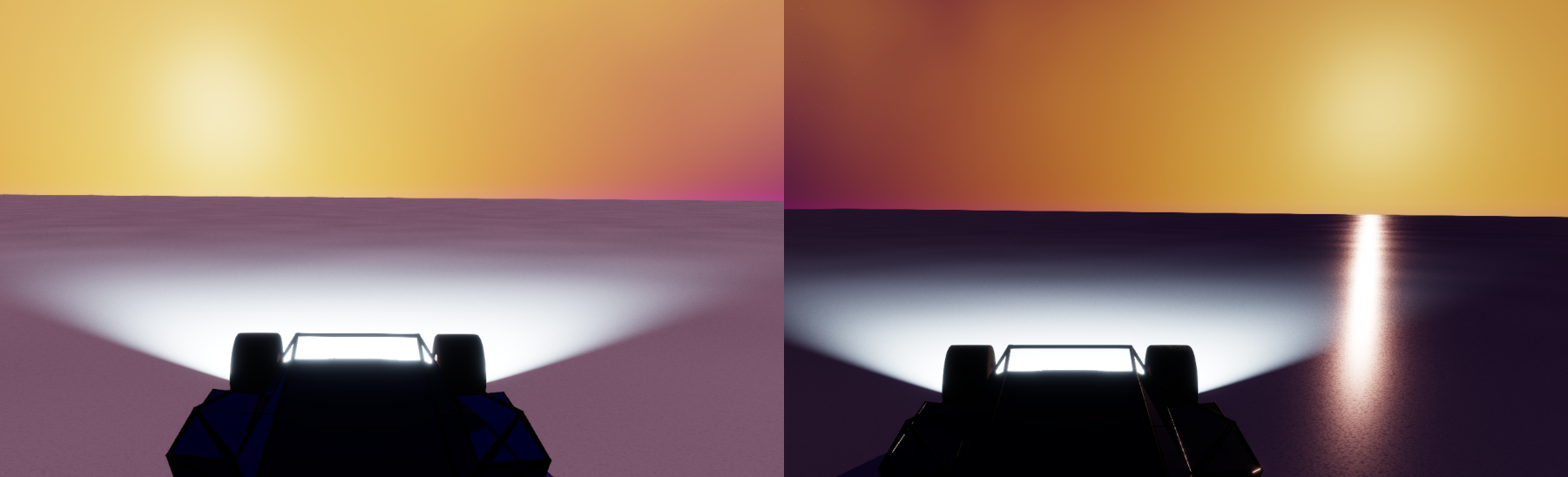
- materials were not applying sun's light correctly (no "BRDF") and so sun had no specular reflection (I have no clue how I let this slide for so long...)
Reflections
Big overhaul on reflections! Including:
- added skybox shader to SSR inputs, to use as fallback when SSR algorithm cannot find a color to reflect
- improved reflection formula to be closer to physics (BRDF applied to SSR reflected color instead of a flat ratio)
- used roughness of reflective material to blur reflection
- fixed ray-marching formula to miss less reflection candidates (I was doing absurd steps, meaning often it would fail to find a pixel to reflect)
I am too lazy to do a before/after, but here is current state:
I still wish to improve it later (notably : at medium distance my tuning is quite wrong and the reflection disappears) but this should do for a while as I have more important things missing.
Ambient Light
Too late, in short:
Ambient light was a flat color (so 2000's), I now implemented an SH9 irradiance calculation pass to have directional ambient lighting. In short, it consists of taking a few samples (I do 64) from the skybox shader in many directions, and then from those compute 9 special vec3 coefficients (they are not all colors). Those coefficients can then be combined (in each material's shader) in a very special way to approximate the environment's ambient lighting in various directions.
If you're curious you can visit 4rknova's post on spherical harmonics; it's worth it, even if it's just to mess around with the interactive sphere.
It's hard to immediately see the effects in my recordings, but what this means is that a surface in the shadow but roughly facing the sun will have a yellow tint, while the same face still in the shadow and facing away from the sun will have a blue tint (per the skybox's colors).
Specular Anti-Aliasing
Still too late, in short:
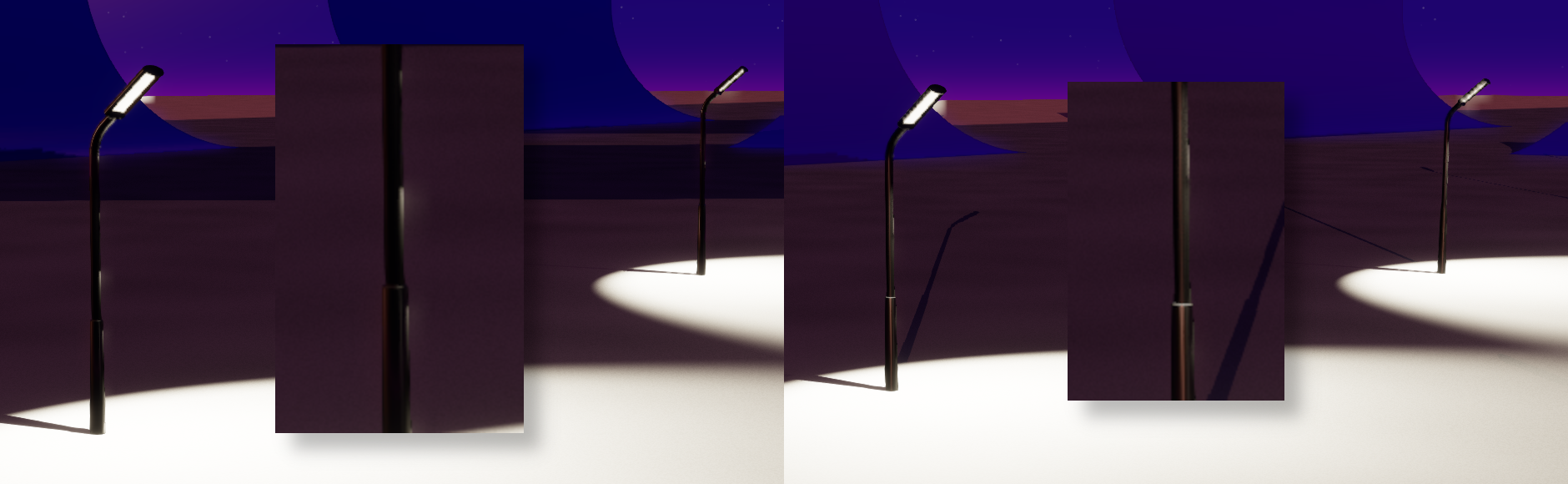
Specular calculation is subject to noise which made some smooth areas have very noisy specular highlights. Implemented specular anti-aliasing which consists of computing final roughness as a mix of texture's roughness and a function of how much normal changes near drawn pixel: the more normal changes, the rougher the surface which smooths those specular artifacts:
Emissive Materials
Well, I was supposed to implement them and I didn't.