
Road Attachments
Quick reminder of where I stopped:
- I have a systems to manage chunks / where player currently is in absolute (regardless of current loaded world) and what chunks should be loaded
- I have system listening to chunk changes to trigger the destruction of chunks that are now too far, and construction of chunks now close enough
- The later systems use a very simple road generator (I don't think I really explained how it works, but I'll now explain as that's why I worked on this week)
Side Task
On Monday I was lacking a bit of motivation, so I decided to work on a side quest. Since I started working in programming and using task management tools (Jira, Azure, etc.) I have been missing one key feature : a graph of dependencies (it surely exists, but I either didn't find it or it was not an installed add-on). Ideally this graph could show my current sprint's tasks and for all those task it would show my and other people's tasks from upcoming sprints that are depending on my work being done. Such graph would make it easy to detect impossible workflows (e.g. B depends on A but both are scheduled on same sprint), or even just tight deadlines (no sprint to spare in a task sequence).
Anyway, I obviously don't have time to do all this and it would be a huge waste of time, so I decided to implement a much simpler TODO-graph. The idea is similar but simpler : I have just a bunch of tasks with dependencies (they are all mines, there is no sprint, etc. but at least I see what I can work on next and what it will "unlock"). I heavily relied on Claude to suggest me libraries to use and walk me through the APIs. And in the end I have something quite simple but satisfying to use:

I will eventually fill it up maybe with my entire game idea? Going backward from "Release Game" to all the little features. Ideally there would be different layers of abstraction, expandable sub-tasks to dive deeper without cluttering main graph, deliverables/deadlines to show urgent tasks to the left, etc. Anyway, I probably won't do any of this but you can have fun with it here (don't worry, it saves all in your browser's data so you can mess with it). Here is a few tips:
- right click to show contextual menu
  - Add Requirement/Dependency requires a left click on another node to then add a link
  - Add Required/Dependent Task will create a new linked task
    - Only title matter
  - Expand does nothing
- double tap in void to refresh layout
- double tap on task to change its state (red = todo, blue = in progress, green = done)
Improving Road Generation
I kinda spoiled my planned work this week in previous screenshot, so let's jump right into it. My overall goal is to improve road generation.
Surface Generation
Let me first explain what you have seen so far: The idea is to store a "road profile" that defines what a slice of the road's surface would look like. This profile is only composed of 2D data (vertex's lateral and vertical coordinate, UV direction, etc.) but it can then be extruded along a 3D path (a rotational path, a bezier cubic, etc.) to create the triangles of a road segment.
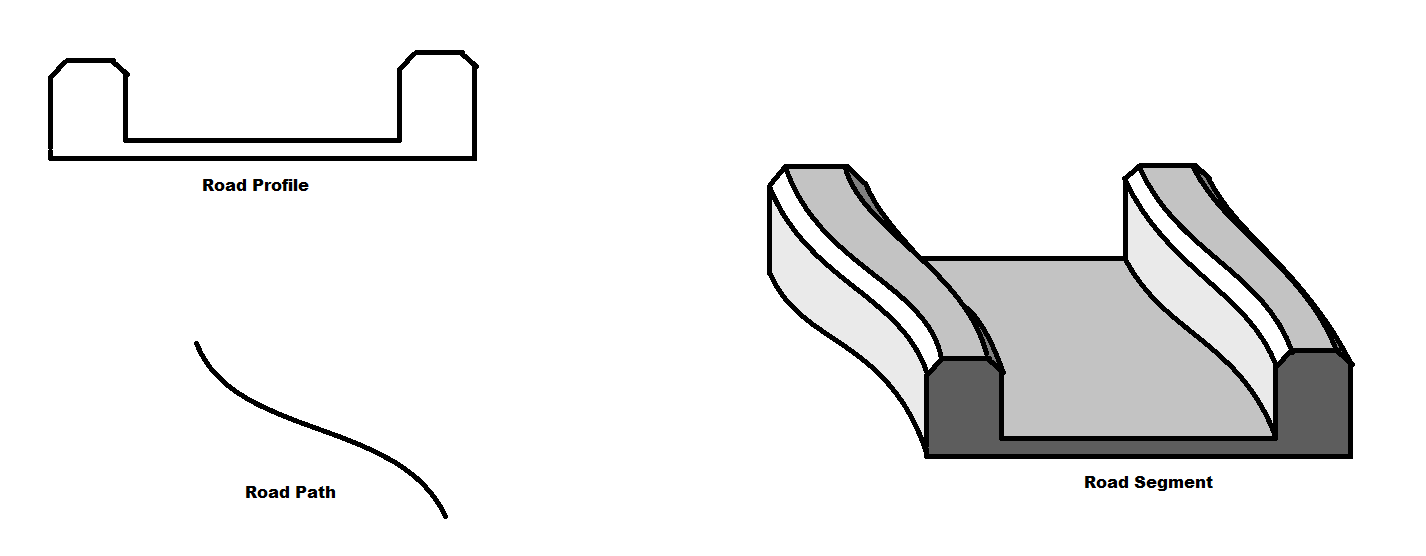
This is nice but very simple: all surfaces are flat without any details that can make a road interesting such as the supporting pole of a fence.
Attachment Generation
So this week I decided to work on implementing attachment generation. The idea is to have a list of attachment types, and for each type I will spawn many instances along the previously generated road surface. I want to allow options such as the following:
- how spaced instances are
- minimum distance from road segment's begin to first instance
- minimum distance from last instance road segment's end
- X/Y positioning along the road profile (constant or with some randomized distribution?)
- pitch/yaw/roll
- ...
This new type of procedurally generated content presents two issues that I will tackle in following sections:
1. there will be many instances of the same mesh to render, surely there is something to do about it
2. there may be many instances of the same colliding geometry (including the BSP tree) which would waste memory (right now each entity has a copy of the full structure)
Instanced Rendering
So the first issue is about rendering the same mesh multiple times. So far, my engine's rendering is done for unique meshes in the following way:
for each mesh instance:
  if mesh's material or shading program changed compared to last used:
    tell GPU material and shading program to use
  tell GPU the transform to render mesh at
  tell GPU mesh to render
  tell GPU to render!
The (not new) idea is for me to implement what is called instanced rendering. Instead of telling GPU to render each instance of a same mesh separately, I have to first store all of their transform together in a continuous buffer then tell GPU to render them all. This should greatly improve rendering performance for those road attachments (I didn't measure but I trust my predecessors). This is obviously a similar technique used by particle systems, except other parameters (particle lifetime, velocity, etc.) are also provided on top of their individual transforms. So I implemented this (see below).
Instanced Physics
So far, as explained above, each collider entity had unique geometry data even if they were similar. Obviously this won't work if I want road attachments that have collision, so I spent a good bit of my week isolating this shared collision data (now I need to store it in a model-local frame rather than the world-absolute one I was using). It was also a good time to cleanup my physics code (and its many unused functions) following the many iterations that happened in the past 2 months.
TODO (I won't): insert blooper video of the many many many bugs I created along the way.
All Together
Ok so I did a lot of more cleanup in the pure road generation part (for instance I am pretty happy with how I abstracted the bezier part so I can reuse the rest with other type of paths), ensuring everything remains deterministic so that both the rendering and the physics world can generate matching rendering model and colliding mesh without ever communicating with each other more than the chunk id (which also acts as a random seed). Before the final video, here is what the TODO-Graph looks like right now:

Here is final result:
The road layout is very simple but I find it actually quite entertaining to attempt accelerating as much as possible while staying on the road and not falling, not as easy as it seem. But if this was too boring to you, I hope you at least skipped to the end to see a fun physics quirk I discovered.