
Fixing Physics
This week was focused on fixing physics, although I went through a few tangents.
To Enjoy Debugging
A friend (and avid reader of the newsletter?) said: ok it's good, but "where is sky box?". And he was right; working with debug shapes in a deep starless sky is a bit depressing. Good thing: my rendering pipeline being almost all setup and customizable, it was just about adding another shading phase to fill those undrawn pixels. I was however a bit too lazy to come up with the shader code myself, and, since I'm using actual glsl/c and not visual scripting, it was easy for Claude (yes, these days Claude really is the guy, far ahead of GPT or Gemini when it comes to understanding complex problems, even before their upcoming model) to come up with a functional "synthwave sky, red/orange around the sun and deep blue/violet away from it" using my custom shading pipeline parameters. A few extra prompts to "add stars and clouds" (this last one will require tweaking, although I will surely redo it all by hand later to fully understand how it's work and have better control over the output) and here is a pretty result:
To Support Debugging
Now, debugging can be quite tricky when the bug happens after specific inputs. And while my simulation has always been deterministic, on Tuesday I had not yet implemented any way to record and replay inputs, only a very simplistic way to revert simulation by 1 tick at most.
So I decided to implement a full replay feature, supporting both state snapshots and input replay, all while supporting my existing simulation pause/play options and while remaining optional (trust me, these last 2 constraints are quite tricky to implement as they have a lot of implication with how inputs are processed and replayed). The gist of it works with the following expectations :
- time system
    - just manages stores update's real start time and elapsed time
- fixed rate time system
    - if simulation is not paused, will increase tick index if enough time has passed
- input system
    - clears previous update's inputs, fetches new inputs from presentation thread
    - pre-processing input events must be done whether simulation is paused or not because of this
- replay system
    - must handle recording and replaying states
    - must handle paused and playing simulation states
- various gameplay systems
    - until a new tick happens, those systems are responsible for storing relevant input events without affecting simulation state
    - when a tick happens, every change must be deterministic based on current input values (float), stored input events, and previous state
- fixed rate limiting system
    - pauses thread to wait until simulation is ready for next tick
    - very optional, it just help not burn CPU
I made a lot of mistakes implementing the replay system correctly, good thing I immediately implemented CRC comparison to detect non-determinism. If I put aside the logic for reverting back to a desired snapshot, here is a more detailed explanation of how it works:
Regardless of whether a tick happened:
- process replay-controlling inputs (e.g. clear history, set snapshot, etc.)
- if replaying, clear input events that should be handled by the replay (e.g. if history records "grab" input, player cannot issue a "grab" input while in replay)
- if not replaying, record input events that should be handled by the replay and would be played next tick

As a new tick happens:
- if tick corresponds to a snapshot (e.g. 0, 100, 200, etc. for 100 tick snapshot interval), do a snapshot (yes, even in replay)
- if replaying, compare that new snapshot to previous one, handle errors, and delete that new snapshot (done just to be compared)
- if replaying, override input state (values and events) with those from recorded history for this tick (obviously only storing changes)
- if not replaying, record current input value changes (not events, they are done above)
Again, it took me quite a few iterations before getting this right, but what a pleasure it is to scroll through simulation snapshots (every tick is quite memory intensive still, but satisfying and handy for debugging) then see simulation replay itself perfectly:
Side note: I also spent the extra time making this game-agnostic, so I can write a custom "SnapshotProcessor" for any type of entity/component to customize it for the game I'm working on. All this together would then help me debug physics...
To Fix Physics
First, let's look at the bugs I would like to fix.
1. Something is not symmetrical with how collisions are handled
2. In banked turns, car looses grip too easily (which triggers sliding and car becomes difficult to handle)
3. Bumping onto surfaces and blockers sometimes leads to unrealistic bounces
Asymmetrical Issue
This one was tricky; here is a close up of what is going on:
At first, but still after a lot of head banging, I spotted this very stupid mistake:
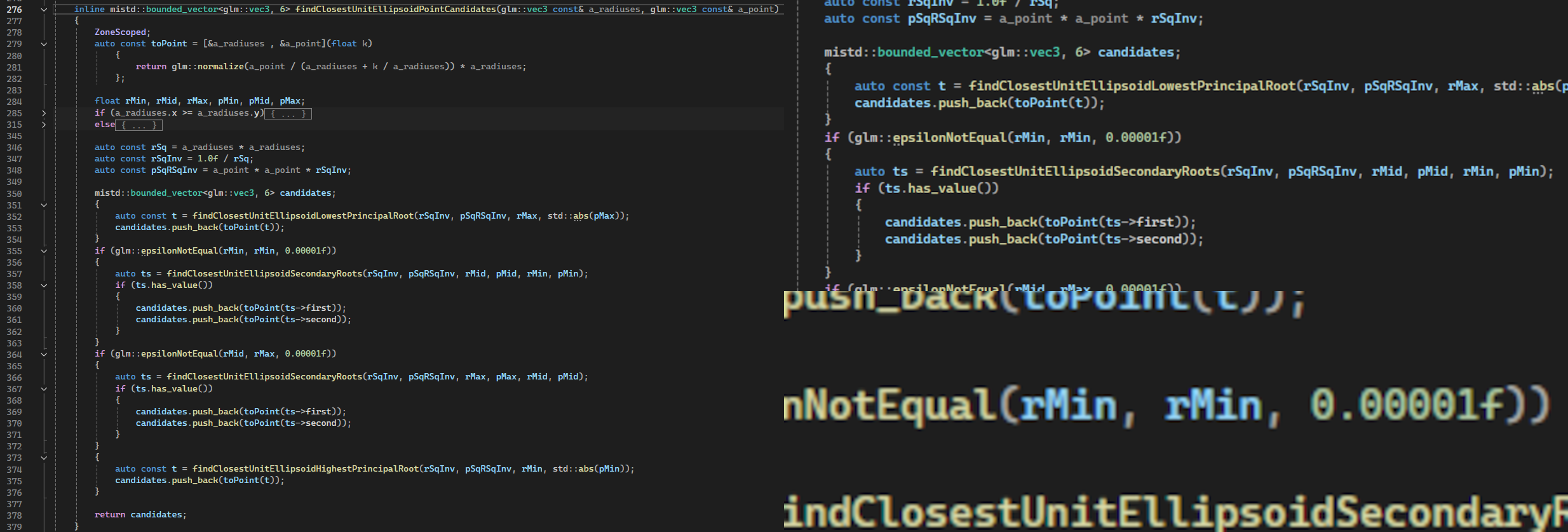
That's what I get for naming my variables `rMin` and `rMid. But anyway, although this probably helped fixed an entire category of bugs I wasn't aware about, this was not the real reason for my physics' lack of symmetry!
So I kept investigating, using my newly implemented replay system to correctly record the exact setup that made the physics break, then ran my algorithm outside the game (Geogebra Classic, I love you). Do you remember the couple weeks I spent ranting about performance and finding contact normal? How it can be done through finding the zeroes of a specific function? I had estimated that it would converge in 4 or 5 Newton steps: I was wrong. It turns out that it taks instead about 7 to 9 steps. Good thing: performance is barely impacted by this.
Erratic Bounces
It didn't take me too long, thanks to my replay and stepping features, to realize that the issue mainly came from over damping and elastic forces exceeding acceptable ranges.
For damping, the issue is that at a fixed integration time step (0.001s), applying dampingForce = - damper × velocity can lead velocity's sign to be inverted in one tick: bad bad, not realistic. With continuous integration this wouldn't be an issue but this is of course not an option. The solution, oh well, is to clamp damper value so damping force can never cancel velocity in 1 physics step. This limits effective damping force for light elements but at least avoids some weird outcomes.
For elasticity, we are facing a similar issue. Mathematically, RK4 algorithm can handle oscillatory systems in a stable way for as long as timestep × 2pi / period < 2.828 is true. Since timestep is fixed and period is related to mass and elasticity, this gives a bound for how high a spring force applied to the wheels can be. I messed a bit with the values but quickly moved on to the following bug hoping to fix everything together:
Loss Of Grip
My initial instinct was that, because my wheels were simulated to be around 10kg, suspensions had too much inertia which was preventing wheels from quickly touching the ground again if they happen to lift for a fraction of a physics update. I tried making them 2kg or even 5kg to start with, but a simple mass change would require tuning all other parameters (suspension elasticity, damping factors, etc.) to reach the same outcomes (e.g. idle car should seat with suspensions at 10cm). This is no easy task, and as I was trying different values the car would yeet into the sky (arf.. I didn't record anything .. sometimes it was beautiful to watch the car fly in the new skybox and with its airborne wheel tracers) or bounce erratically.
The issue is that the way I was configuring my physics was through "real" parameters (elasticity, rest length, etc.). I want those settings to be what physics uses because this is what yields realistic yet systemic outcomes, but when I act as a designer I want to define physics through more human-friendly features:
- how high the car should sit on its suspension while idle
- how far suspensions can go
- how long should a suspension take to go from fully compressed to its max length (this would help avoiding skipping in banked turns)
So I created a system to help me tune physics. It exposes human-facing parameters then derives them to retrieve matching physics parameters:
Before:
- suspension rest length
- suspension elasticity
- suspension damper
- compressed elasticity (elasticity used when suspension exits acceptable range, so it pushes harder to go back)
- compressed damper

After:
- suspension min compression ratio (not the best, but easier than rest length)
- suspension grounded length (how high suspensions are when car sits idle)
- suspension damping factor (0.0 = perfectly bouncy, 1.0 = perfectly absorbs the bounce, much easier than defining the damper directly)
- suspension max penetration (for an arbitrary "max collision speed", how far I want to allow suspension to exceed its acceptable range at most)
- compressed damping factor

Then solving:
- suspension rest length = max length / (1 - min compression ratio)
- suspension elasticity = car mass * gravity / (4 * (rest length - grounded length))
- compressed elasticity = wheel mass * max speed^2 / max penetration^2
- suspension/compressed damper = damping factor * 2 * sqrt(elasticity * mass / 4)
And here is a video of how I can now tune physics parameters with simple human-friendly parameters, as well as a test lap around the gym's circuit to show how it fixed the wheel skipping issue (I think it's also fun enough to watch to replace the blooper video):
(if you pay attention, at 4:22 you can see how automatic gear switch temporarily stops acceleration, leading suspensions to equalize, while rear ones are more compressed than front ones when car is accelerating)
Hope you enjoyed and have fun until next week!